Three people working a stand, three phones, three separate lists. Sound familiar? Whether there are three of you or thirty, LeadLog puts everyone on one list. Invite your team by email and from that moment every lead anyone captures shows up for all of you. After the show, one export has the lot.
Invite once. Share everything. No codes to pass around.
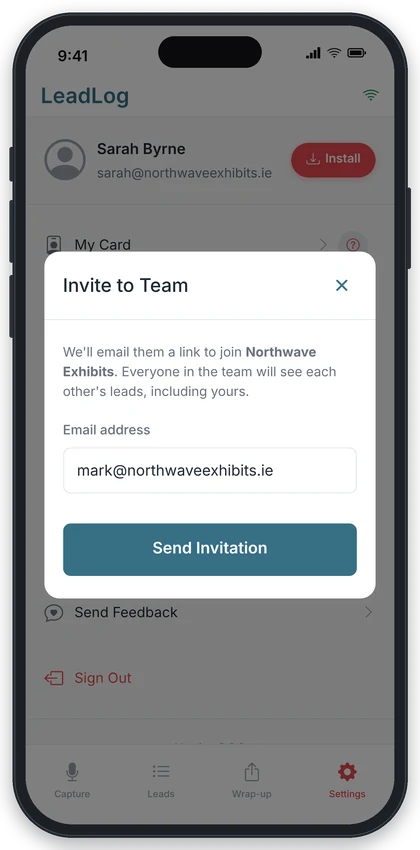
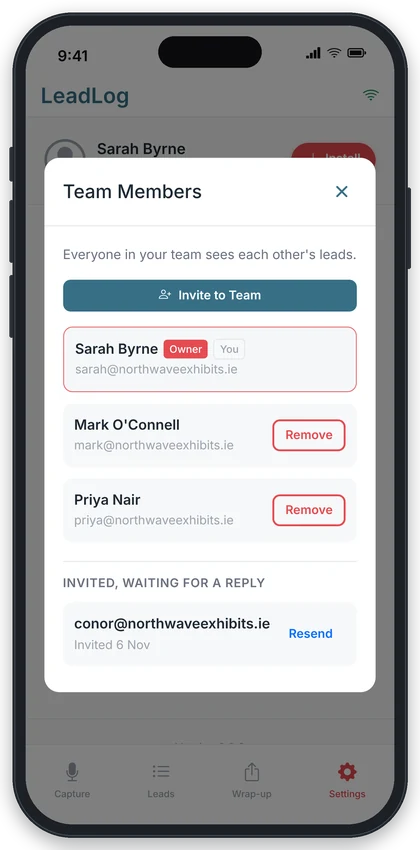
In Settings, tap Invite to Team and enter a colleague's email address. They get an email with a Join button, and you can see who's still to reply under Team Members.
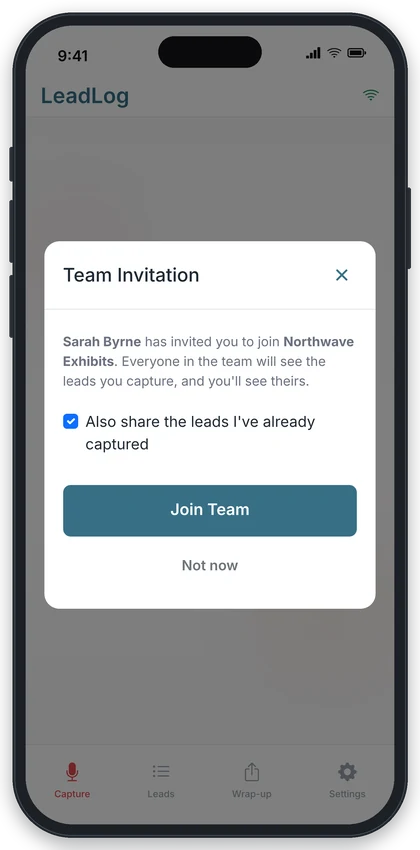
Your colleague opens the link, signs in or creates an account, and the invitation pops up. One tap and they're in. They can share the leads they've already captured at the same time.
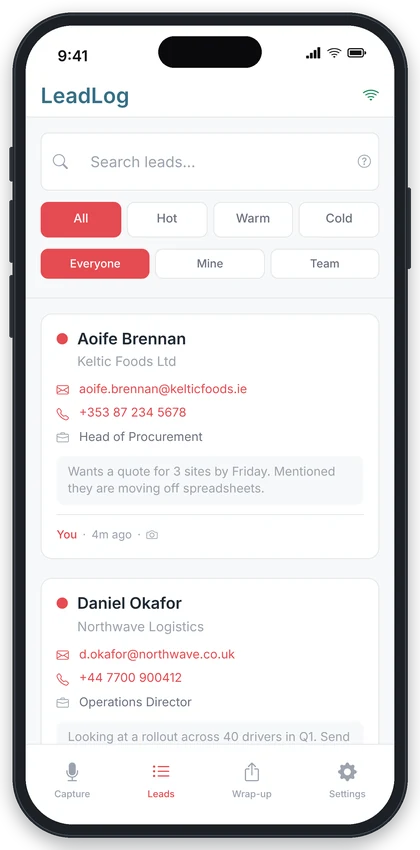
From then on, every lead anyone in the team captures appears for all of you, with the name of whoever captured it on the card. No swapping codes, no one-way sharing.
Excel and email exports cover the whole team, so after the show one file has every lead from every person on the stand.
Inviting, joining and keeping an eye on who's in
Built for a busy stand, not a sales office
Every lead from every person, in one list, as it happens, whether that's two of you or a whole sales team across several stands. Each card shows who captured it, so you know who had the conversation.
No codes to read out over a noisy stand. Type an address, they get a link, they tap Join. You can see who's still to reply.
Excel and email exports cover the whole team. No chasing colleagues for their spreadsheet on the Monday after.
Leads captured for the team stay with the team. Leads someone brought in go back to them. Nothing is lost either way.
The rules, in plain English, so there are no surprises
Whoever sends the invitations is the team lead. Their workspace becomes the shared one, and their own leads are shared with the team like everyone else's.
Members see the team lead's leads and the team lead sees the members' leads. Everyone sees the same list, with Mine and Team filters if you want to narrow it.
When you join, a ticked box offers to share what you've already captured. Untick it and those stay private in your own workspace.
Leave, or be removed, and the leads you captured for the team stay with it. Leads you brought in come back to you. New leads from then on are yours alone.
Send invitations the week before so everyone has joined and tested a capture before the doors open.
The invitation matches on email. If a colleague uses a different address for LeadLog, invite that one.
Five people with five ideas of a hot lead makes the export hard to use. Thirty seconds of agreement beforehand saves an hour after.
If someone's still listed as waiting for a reply, tap Resend and get them to check their inbox.
Everything about working as a team in LeadLog
One person is the team lead and their workspace is the team. They invite colleagues by email from Settings. Once someone accepts, every lead captured by anyone in the team is visible to everyone in it, and exports include the whole team.
Go to Settings, tap Invite to Team and enter their email address. They'll get an email with a Join button. If they already have a LeadLog account, the invitation also pops up the next time they open the app. Under Team Members you can see who hasn't replied yet and resend.
When you accept an invitation there's a box, ticked by default, to share the leads you've already captured. Leave it ticked and they move into the team for everyone to see. Untick it and they stay in your own workspace.
Leads they captured while in the team stay with the team. Any leads they brought with them when they joined go back to their own workspace. From then on, anything new they capture is theirs alone.
One team at a time. If you lead a team with members in it, you can't join someone else's team until those members are removed, and you can't join a second team while you're still in one. Leave first, then accept the new invitation.
No. Invite as many people as you need. A team of three on one stand or thirty across a multi-day show both work the same way, with everyone seeing the same list and one export at the end.
Yes. The free plan and Pro plan apply per person. Team sharing itself is available on both, so a free user can be a member of a team, but the free lead limit still applies to the leads they capture.
Start free. Invite your team in under a minute.
Already have an account? Launch App